
Claim Issues: Rejections and Denials
When a claim cannot be processed, it is categorized as either a clearinghouse rejection (prevented from reaching the payer due to formatting or missing data) or an insurance payer denial (processed by the payer but refused for payment). This guide covers how to spot clearinghouse rejections, understand common rejection reasons, and quickly fix them.
In this article:
Clearinghouse Rejections
Claims can be rejected by the clearinghouse when required information is either missing, inaccurate or formatted incorrectly. If the clearinghouse rejects the claim, the Status tab message will indicate that it was rejected and the reason why. You can confirm the source of the rejection by looking at the attribution line underneath the message (e.g., from Claim.MD vs from the specific insurance payer).
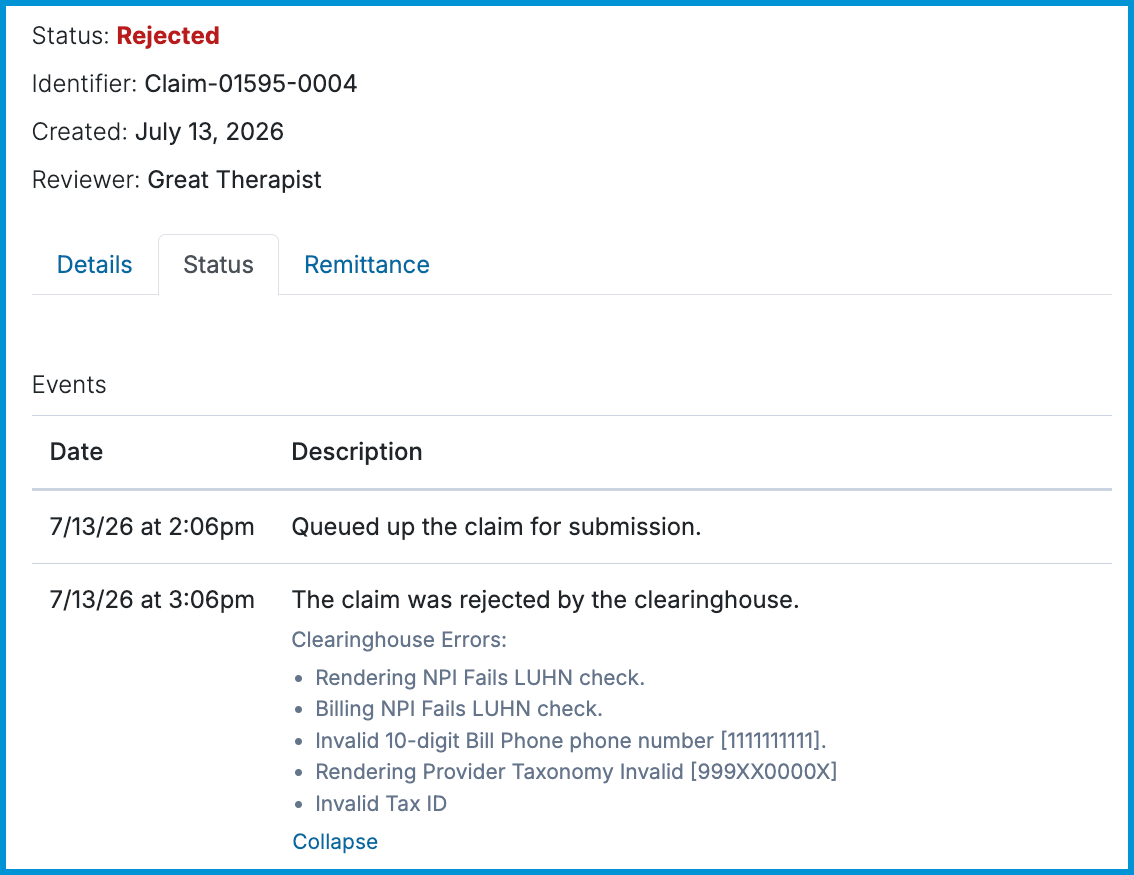
Common Rejection Codes from the Clearinghouse
- Diagnosis Code Invalid [F42] (or similar codes like F431, F33, F112, F32, F101, F90): The diagnosis code is valid, but non-billable. The payer requires diagnosis codes to be specified to the highest level of detail (e.g., F42.2, F42.3) or does not cover services for that diagnosis. Adjust the code on the claim before resubmitting.
- Invalid Modifier [95]: The insurer does not accept claims with this specific modifier. Most insurers expect modifier 95 with place of service codes 02 or 10, while others require GT or no modifier at all. Additionally, if the place of service is 11 with modifier 95, the clearinghouse cannot forward the claim. Remove or update the modifier before resubmitting.
- Invalid Frequency Code [6]: When resubmitting claims previously denied by a payer, most payers require claim resubmission codes 7 or 8. Update the resubmission code in the claim settings before resubmitting.
- Diagnosis [F438] is valid, but not for this date of service: The code used is no longer active or billable for that service date. Update the diagnosis code before resubmitting.
#️⃣ Claims rejected by the clearinghouse do not need a resubmission code, nor do you need to delete the claim. Simply correct the information directly on the claim and resubmit it to the clearinghouse.
Payer Rejections and Denials
A payer rejection or denial occurs after the claim has successfully passed through the clearinghouse and been delivered to the insurance company. The payer has reviewed the claim and determined it cannot be processed or paid as submitted.
Spotting Payer Responses
On the claim's Status tab, payer updates will display a source attribution line naming the insurance company.
Common Reasons for Payer Denials
- Member/Subscriber Eligibility Issues: The patient was not active on the date of service or policy details were entered incorrectly.
- Prior Authorization Required: The procedure or service required prior approval that was not attached to the claim.
- Timely Filing Exceeded: The claim was submitted past the insurer’s deadline.
- Duplicate Submission: The claim was already received or processed under another claim ID.
How to Resolve Payer Denials
Unlike clearinghouse rejections, resolving a payer denial often requires reviewing the remittance advice (ERA / EOB) to find the exact denial code, and then submitting a corrected claim using resubmission code 7 (Replacement) or 8 (Void).
💡 For a list of specific denial reason codes, see Claim Issues: Common Denial Codes and How to Resolve Them. For step-by-step instructions on resubmitting a claim to a payer, see Claim Issues: How to Resubmit a Claim.
Frequently Asked Questions
How do I resubmit my denied or rejected claims?
See our guide on Claim Issues: How to Resubmit a Claim for information about how to resubmit claims that have been rejected or denied.
How do I know when a claim gets rejected or denied?
The Daily Digest notifies Sessions Health customers of several different important events. Any time we receive information from the clearinghouse that you have denied or rejected claims that need to be reviewed, you will receive a notification in your Daily Digest. Additionally, rejected or denied claims will be in the Needs Attention area of the Home Page.
What does the "from [Source]" attribution line mean on my Status tab?
The attribution line (e.g., from Claim.MD, from UHIN, from Aetna) indicates exactly which entity sent that specific status update. This helps you quickly confirm whether an update or rejection came from the clearinghouse or directly from the insurance payer.
Does a clearinghouse rejection count against my timely filing deadline?
Yes. A clearinghouse rejection means the claim was stopped before it reached the insurance payer, so the payer has no record of receiving it. You must fix the error and successfully submit the claim through to the payer before your timely filing deadline passes.
Do I need to delete a rejected claim to fix it?
No. Never delete a rejected claim. Simply open the rejected claim, edit the incorrect information directly (or update the client/billing settings), and click Resubmit. Deleting claims erases the event audit trail on the Status tab.
Related Resources
Check out these related guides for step-by-step instructions on managing claim statuses, resubmitting claims, and decoding denial codes: